
Tune, mode and filters
Change frequency, mode and filter width from any signed-in device, live.
41 features, 8 groups
Each feature below ships in the current release, in every app: Windows, Android, iPhone and iPad, and Mac. Where a feature is only in some apps, its card says which.
01
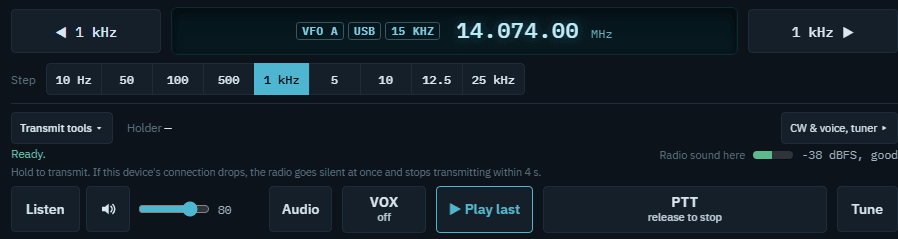
Change frequency, mode and filter width from any signed-in device, live.
Transmit on a different frequency than you receive, for working DX and nets.
A second receiver alongside your main one, on radios that support it.
Move the rotator, amplifier and controls to a different radio with one choice.
Station memories you add, edit and recall, plus the radio's own memory channels. Recalling one never transmits.
Send typed CW and eight CW memories kept at the station, and play the radio's voice memories.
02
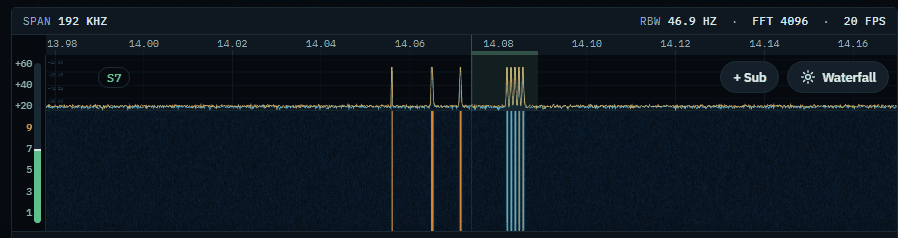
On Icom radios with a spectrum scope, watch the band fill in real time, straight from the radio's own scope.
See who is being heard in a list, and on radios with a scope, right where they sit on the waterfall.
Post what you're hearing to the DX cluster, previewed before it goes out, and to POTA when it has a park reference.
Step through the signals on the waterfall without hunting for them by hand, on radios with a scope.
Solar flux, K and A index, sunspots and band-by-band conditions, fetched by the station.
03
The station decodes and sends FT8 and FT4 itself, with WSJT-X's decoder built in. Nothing else to install.
A decode's reply carries on through the standard QSO sequence by itself.
Your message goes out on the station's own clock, even if your connection lags.
04
Every operator logs to the same record, so nothing is split across devices.
Country, beam heading and distance fill in as you log the contact. Add your QRZ.com login for the name, and a QRZ XML subscription for the grid.
Once you add your accounts, contacts upload to QRZ.com, LoTW, Club Log and eQSL, with status on each one.
Track your confirmed entities and states as they come in, counted the LoTW way.
Import an ADIF file (.adi or .adif), including logs exported from Ham Radio Deluxe, with its own fields kept.
Download the whole log as one ADIF 3.1.4 file for any other program.
Each spot is marked new, worked or dupe against your log, with new countries and new bands called out.
Record the other station's POTA, SOTA or IOTA reference on the contact, with its format checked.
05
Turn the rotator to a bearing or a logged contact, with live position shown.
Send the rotator to its rest position before you sign off.
See the amplifier's power and band at a glance, read directly off amplifiers with a data link, such as the SPE Expert.
Turn the antenna toward the station you just looked up, or a spot, in one tap.
06
If your device's heartbeat stops, your audio is muted after 1.5 seconds and the transmitter unkeys about 4 seconds after the last one. A closed connection unkeys at once.
In the Windows and Android apps, when the radio transmits from anywhere else (a tune, CW, FT8 or another operator), your PTT turns red and reads STOP. One tap ends it.
Let go of PTT, or tap it again in tap mode. A tune, CW or voice memory you started has its own stop, and a latched PTT lets go if you leave the app or lose the connection.
Transmit is refused if the amplifier isn't confirmed set to the right band. For an amp with no data link, the station owner can choose to accept that risk instead.
07
Each operator signs in with their own callsign and password: listen only, transmit, or admin. Operators are added in the station's Settings, in the Windows app.
Approve a new phone, tablet or PC from the station, no password to type.
Your station keeps its own secure internet address, with nothing to open on your router.
A new operator asks to join, and you decide before they get access.
08
An installed app for the station PC and for any other PC you operate from. Close the window and it keeps running in the tray.
The Windows app plays the radio and sends your microphone itself, for lower delay from key to air.
A keyboard shortcut that keys even while another program has the focus, or a USB foot switch. Both are off until you set them up.
Tune with a Griffin PowerMate, a Contour ShuttleXpress or ShuttlePRO, or a MIDI controller, detected by itself.
Logging programs on the station PC, such as WSJT-X, can read and tune the radio through the station, and WSJT-X's logged contacts land in your log. Both are off until turned on in the station's settings file.
A native app built for operating on the go, from your phone or tablet.
A native app from the App Store for operating from your pocket or your desk.
What you use in HRD today, and where it lives here.
Logbook
One log at the station that every app shares. Import your HRD log as an ADIF export (its HRD fields are kept), and export ADIF any time.
Every app; import and export in the Windows app
DX Cluster
Spots from the cluster node you choose, in a list and (on radios with a scope) on the waterfall, marked new, worked or dupe. Tap one to tune.
Every app
Spotting
Post a spot to the cluster after a preview, and to POTA when it carries a park reference.
Every app
Callsign lookup
Country, beam heading, distance and worked-before for the call you enter, plus name from QRZ.com with your QRZ login (QTH and grid need a QRZ XML subscription).
Every app
QSL uploads
Once you add your accounts, new contacts go to QRZ.com Logbook, LoTW (through TQSL on the station PC), Club Log and eQSL, and confirmations come back.
Every app
Awards
DXCC and Worked All States progress, worked and LoTW-confirmed.
Every app
Rotator
A compass to click or a bearing to type, stop and park, and Beam to contact from the log or a spot.
Every app
Rig control
CAT control through Hamlib, with your radio's own scope on Icom radios that have one.
Every app
Memories
Station memories you name and recall, and the radio's own memory channels.
Windows and Android apps
Digital modes
FT8 and FT4 built into the station, with auto-sequencing, plus CW from the keyboard and CW memories.
Every app
Solar data
Solar flux, K and A index, sunspots and band conditions.
Windows app
Running HRD too
Keep Ham Radio Deluxe on the station PC: Pause N6YYO Remote Base to release the radio to it, then Resume.
Station PC Start menu
Ham Radio Deluxe is a trademark of HRD Software LLC. N6YYO Remote Base is not affiliated with or endorsed by HRD Software LLC.
The trial is the full product, remote access included. No card needed.